


Family Space
3.91.86K Reviews
App Specs
- Version
- 3.1.55.8
- Updated On
- License
- Free
- Downloads
- 100,000,000+
- Developer
- Motorola Mobility LLC.
- Categories
- Parenting
- Platform
- Android, iOS
Screenshots

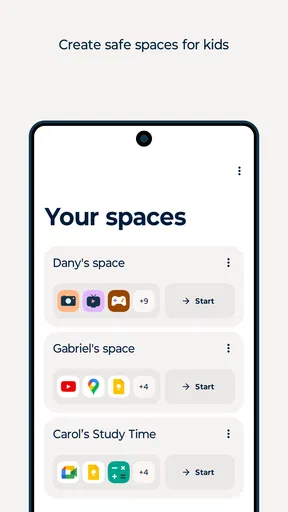
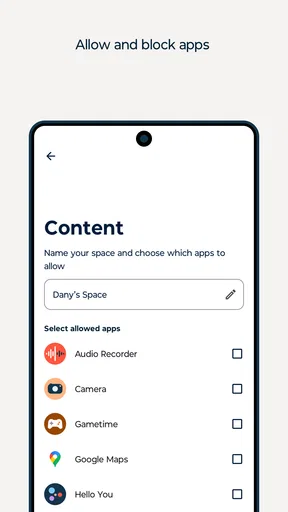
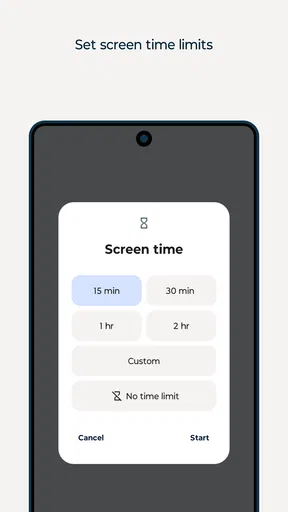
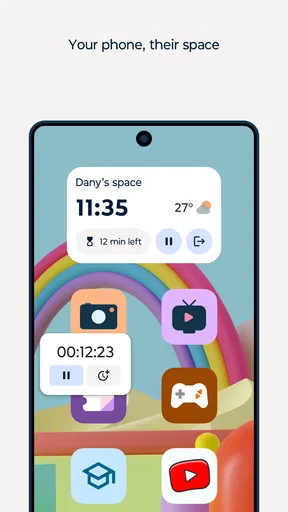
 Analysis by AppCompare
I can’t verify hands-on details such as specific controls, location alerts, messaging, or calendar functions from the confirmed product information, so I’ll avoid presenting those as personal experience. I can still provide a useful review grounded in what is confirmed about Family Space.
Choosing a family app is less about collecting the most controls and more about finding an approach that fits your household. I’d start by asking what you actually need help with: setting healthier device routines, giving children more independence, or coordinating family life. Family Space is positioned as a parenting app for digital caretaking, so it belongs in the conversation when the main goal is managing family technology rather than replacing every tool a household already uses.
That distinction matters. A parental-control app, a location-sharing tool, and a shared calendar solve different problems, even when families sometimes want all three. Before installing anything, I’d agree with the other adults in the household on what the app is for and explain the plan to the child in age-appropriate terms. A tool is more likely to help when its rules are clear and consistent than when it becomes a surprise way to monitor someone.
Choosing a family digital-care routine
I’d begin this section by deciding what you want a family digital-care routine to change in everyday life: fewer arguments about devices, clearer expectations, or more room for children to manage their own habits. That choice gives you a practical way to judge whether an app is helping, rather than adding another screen to check. From there, I’d look at how well a shared routine can fit the different needs and ages in your household.
Start with the problem you want to solve
For a parent who mainly wants to establish predictable technology habits, Family Space may be a relevant option to investigate. Motorola Mobility LLC. develops the app, which is free and has an Everyone age rating. It has a 3.8 average from around 22,000 ratings, with roughly 1,700 written reviews. Those figures suggest a widely used app with mixed-to-positive reception, not a guarantee that every feature or setup will suit your family.
I’d treat the first setup as a family conversation rather than a quick technical chore. Decide which devices and routines are in scope, what level of oversight feels reasonable, and how a child can ask for an exception. For example, a school project that runs late is a useful case to discuss before a device rule causes friction. The practical benefit is not simply having controls; it is having a shared expectation about when those controls apply.
Where a single family app can help
The appeal of a dedicated family tool is having a place to think about digital boundaries without relying only on repeated reminders. Family Space’s name and purpose make it a natural candidate for parents who want to bring digital caretaking into their household routine. The app has passed 100 million installs, so it is not an obscure experiment, though popularity alone cannot tell you whether it matches your needs.
Worth Reading Before You Choose

Flipboard Shows What News Apps Must Do Beyond the Feed

Switching to Android Auto Means Rethinking Your Driving Routine

Google Calendar Makes a Crowded Week Easier to Manage

Ludo King Makes the Most of the Minutes Between Plans

Baby Panda World Brings Quick Play to Modern Phones, but Its Game Library Feels Busy

ESPN’s Live Game View Makes Following Close Games Easier
A realistic use case is a parent trying to make evenings calmer. Rather than renegotiating device expectations every night, the family can settle on a routine in advance and use the app as one part of following it. I’d still keep a human check-in in the routine: ask whether the child has finished homework, whether a planned call is important, or whether a rule needs adjusting. Technology can support a boundary, but it cannot judge every family circumstance for you.
Where another kind of tool may fit better
If your main concern is simply knowing when a family member has arrived somewhere, a location-focused option may be a better fit than a broader parenting app. If the challenge is coordinating pickups and activities, a shared calendar may be enough. And if your household already has a digital-wellbeing tool that everyone understands, adding another layer could create more work than value.
The trade-off is between consolidation and specialization. A single family app can make the idea of digital care feel more organized, but a tool built around one task may be easier to explain and maintain. I would avoid choosing based on the longest feature list. Instead, name the recurring problem, test whether the app addresses it in your daily routine, and keep the setup only if it reduces confusion rather than adding another place to check.
What to expect when making a change
Switching family routines has a social cost as well as a setup cost. Children may need time to understand a new boundary, while parents may need to coordinate how they apply it. If you are moving from informal reminders to an app-supported routine, start with one clear goal instead of changing several expectations at once. That makes it easier to see whether the change is helping and easier to adjust without turning every disagreement into a debate about the app.
Families should also think about fit across ages. Younger children may benefit from simple, consistent limits, while older children are more likely to respond well when the reasons behind a rule are discussed and their growing independence is taken seriously. A single approach rarely works equally well for every child. I’d review household rules periodically and make changes openly, rather than treating an app setting as a permanent decision.
Features that Stand Out
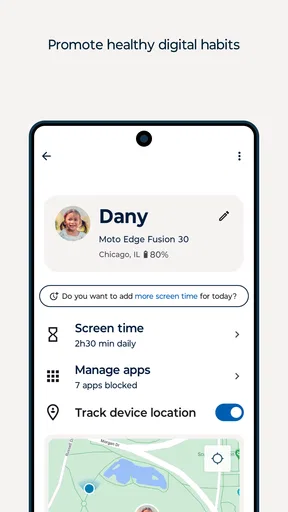
Now, let’s dive into the features that really make Family Space stand out. First up, the screen time management. This feature is a godsend for parents trying to manage their kids' digital consumption. You can set daily limits and even schedule downtime when devices are off-limits. No more battles over screen time during dinner—it’s all handled by the app.
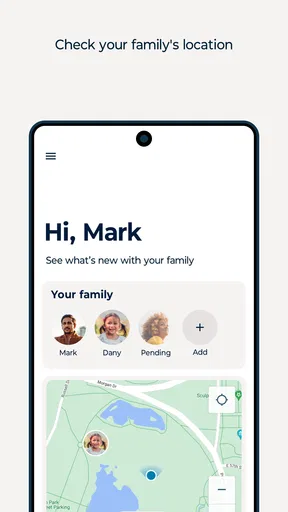
Then there's the location tracking. I know, I know, it can sound a bit Big Brother-ish, but hear me out. It’s not about spying; it’s about peace of mind. You get alerts if your child leaves a designated area, which is perfect for those moments when they’re off to a friend's house or a school outing.
Another neat feature is the app management. You get to approve or block apps your kids want to download. Plus, there's a handy feature that lets you see what apps they’re using the most. It’s like having a window into their digital world.
Keeping Everyone in the Loop
Communication is key, right? Family Space gets that. The app has a built-in messaging feature that lets you send quick updates or check-ins. It keeps everyone in the loop without having to jump between different apps. And, if you’re like me, juggling a million things at once, this feature is a lifesaver.
There's also a cool family calendar feature where you can keep track of everyone's schedules. Gone are the days of missing soccer practice or forgetting about that school play. It's right there in the app, making organization a family affair.
For location tools, I would treat an alert as a prompt to check in, not as proof that everything is fine or wrong. A child might leave a planned area for an ordinary reason, and location information can lag or be imperfect. It is sensible to agree on what parents will do after receiving an alert and to keep a direct way to contact one another. That avoids turning a convenience feature into a source of unnecessary panic.
App oversight also works best when children understand the rule behind it. A parent could explain that new downloads need a conversation, then use approval as a pause for that discussion rather than a silent veto. Looking at which apps get the most use can prompt a useful question—what does the child enjoy or need from that app?—but it should not replace talking to them about what they encounter online.
For a shared calendar or messaging feature, the practical test is whether family members will actually check it. A low-friction routine helps: add a school event when it is confirmed, and agree that time-sensitive changes still get a direct message or call. This keeps the calendar from becoming a second source of truth that some relatives forget to open. A family app can centralize information, but only if everyone knows which channel to rely on for urgent updates.
A Few Hiccups
Now, nothing's perfect, right? While Family Space is pretty awesome, there are a couple of areas where it could improve. Sometimes, the app can be a bit slow to update location data. It's not a dealbreaker, but something to keep in mind if you’re relying on it for real-time updates.
Also, the learning curve can be a bit steep for some of the more advanced features. It’s not rocket science, but a little patience goes a long way. Once you get the hang of it, though, it’s all smooth sailing.
Those limitations matter most when expectations are too high. If a parent needs instant, dependable location awareness for a safety-critical situation, an app should not be the only plan; direct contact and ordinary supervision remain important. Likewise, a complex setup can be counterproductive if caregivers do not have time to learn it or if rules differ from one adult to another. I’d begin with the essentials, make sure everyone responsible for the child understands the routine, and add complexity only when it solves a real problem.
One useful way to judge whether the arrangement is working is to look for fewer repeated arguments, not simply more monitoring. If a limit routinely blocks homework or a family plan, revisit the rule. If location checks make a child feel distrusted, discuss when they are used and why. Those conversations are not a weakness in the system; they are how parents keep digital boundaries proportionate to a child’s age and circumstances.
Wrapping It Up
So, is Family Space worth your time? In my book, absolutely. It offers a solid mix of safety features and parental controls wrapped up in an intuitive package. Whether you’re a tech wizard or a complete novice, this app makes it easy to keep tabs on your family's digital life.
Overall, Family Space provides a great way to ensure your kids are safe while still enjoying their digital freedom. If you’ve been on the fence about diving into parental control apps, give this one a shot. It might just be the digital guardian angel you’ve been looking for.
The practical question is what to do before relying on it. The current version is 3.1.55.8, and the app was released on January 11, 2023. It requires Android 12 or later, so check that requirement against the device you intend to use before building a routine around it. Since it is free, trying it does not require a purchase, but the more meaningful cost is the time spent configuring expectations and helping family members adapt.
I’d recommend considering it if you want a parenting-focused place to support digital routines and are willing to discuss the rules with your children. I’d skip it if you only need a shared calendar, prefer a narrowly focused tool, or do not want family technology to involve monitoring. My clearest advice is to choose one everyday problem, test whether Family Space makes that problem easier to handle, and keep the approach flexible. Used as a support for trust and communication, it may be useful; treated as a substitute for either, it is unlikely to do the hard part for you.
Pros
- User-friendly interface for easy navigation.
- Parental controls ensure child safety.
- Customizable profiles for each family member.
- Real-time location tracking feature.
- Secure messaging within the family group.
Cons
- Limited features in the free version.
- Notifications can be overwhelming.
- Requires stable internet for tracking.
- Some features are region-restricted.
- Occasional app crashes reported.
FAQs for Family Space
What is Family Space, and how does it work?
Family Space is a comprehensive app designed to help families stay connected and organized. It offers features like shared calendars, task lists, and location tracking. Users can create profiles for each family member, allowing everyone to share updates, events, and reminders seamlessly. It integrates with both Android and iOS devices, making family management easier across platforms.
Is Family Space safe for children to use?
Yes, Family Space prioritizes safety, especially for children. The app includes robust parental controls that allow parents to monitor and manage their children’s activities. Location tracking and privacy settings ensure that children’s data is secure and only shared with authorized family members, providing peace of mind for parents.
Does Family Space require an internet connection to function?
Family Space primarily works over an internet connection to sync data and updates in real time across devices. However, some features, like task lists and calendar events, can be accessed offline and will update automatically once a connection is reestablished. This ensures that important information is always at your fingertips.
What devices are compatible with Family Space?
Family Space is compatible with both Android and iOS devices, including smartphones and tablets. The app ensures cross-platform functionality, allowing family members to stay connected regardless of their device preference. It also supports integration with smart home devices, enhancing its utility in everyday family life.
Are there any subscription fees for using Family Space?
Family Space offers both a free version and a premium subscription. The free version provides basic features suitable for most families, while the premium version includes advanced options like additional storage, enhanced parental controls, and priority customer support. Users can choose the best plan based on their family’s needs.


